
- Joined
- Oct 27, 2025
- Messages
- 352


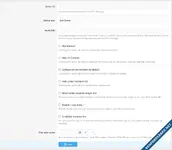
The discord widget is fully customizable with style properties as well.
Installation:
- Follow the standard add-on installation procedures.
- Once installed, you need to insert your discord server's ID into the "Server ID" option field.
- Right click on your Discord server and click on "Copy Server ID."
- Make sure "Enable Widget" is checked on your discord server's settings.
- Right click on your Discord server and click on "Server Settings."
- Click on "Engagement" on the left and towards the bottom click on "Enable Server Widget."
- Go to the user group permission area and make sure that the "View Discord Widget" permission is set to "Yes" for whichever groups you want to see the discord widget.
- Go to the widget area of the admin control panel, and add the widget titled "[AH] Discord Widget" where ever you desire.
Attachments
![[MusaPekel] FindNode – Smart Forum/Category Search Widget](https://xenforoleaks.net/data/attachments/1/1596-f9ad3982a7e74ef276795a36f1466cac.jpg)

![[Blatchy] Weather Widget](https://xenforoleaks.net/data/attachments/0/639-4d7140306816c92748794aafddeb1ed4.jpg)

![[cXF] New Threads Widget Plus](https://xenforoleaks.net/data/attachments/1/1697-7c7072204fa6568a5d001dbc7a1e1902.jpg)
![[cXF] Widget Tabs](https://xenforoleaks.net/data/attachments/0/951-21bdab6a0cc871af3a2b87cd9ed9766c.jpg)
![[XB] Widget: Attachment Image Slider](https://xenforoleaks.net/data/attachments/1/1668-e7d30a337370ff6a13fbccc6a1e7baff.jpg)