![[Andy] Photo contest](https://xenforoleaks.net/data/attachments/1/1274-a0e54561c5b6f5ae9da01ede4fed1e01.jpg)

- Joined
- Oct 27, 2025
- Messages
- 352
Description:
Allows creating photo contests.
Members can submit a picture by replying to the photo contest thread you create. Any member can then use reactions to vote for their favorite photos. Reaction totals along with each post image thumbnail will show at the top of the thread.
(Example of Photo contest block)

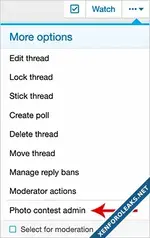
(Example of Photo contest admin link)
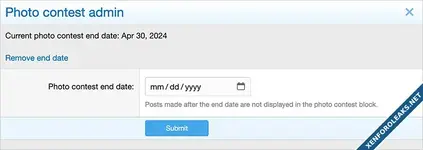
(Example of Photo contest overlay)
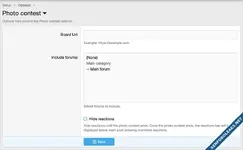
(Example of Options page)
(Example of User group permissions)

Features:
This add-on will add a new column called 'andy_photo_contest_end_date' to the xf_thread table.
Question and Answers:
Q: What happens if a member posts after the photo contest end date?
A: Posts made after the photo contest end date are not displayed in the photo contest block.
Allows creating photo contests.
Members can submit a picture by replying to the photo contest thread you create. Any member can then use reactions to vote for their favorite photos. Reaction totals along with each post image thumbnail will show at the top of the thread.
(Example of Photo contest block)
(Example of Photo contest admin link)
(Example of Photo contest overlay)
(Example of Options page)
(Example of User group permissions)
Features:
- Shows thumbnail of submitted post.
- Shows number of reactions of submitted post.
- Option to not show reactions until contest ends.
- Clicking thumbnail takes you to the post.
- All phrases start with photocontest_ for your convenience.
- In the options page select the forum where you will have photo contests.
- In the user group permissions, select the user groups that will "View" and "Admin" the add-on.
- Create a new thread for a photo contest.
- From the more options dropdown, click the Photo contest admin link.
- Select the end date for the photo contest.
- In post #1 of the thread describe the photo contest rules and end date for photo submissions.
This add-on will add a new column called 'andy_photo_contest_end_date' to the xf_thread table.
Question and Answers:
Q: What happens if a member posts after the photo contest end date?
A: Posts made after the photo contest end date are not displayed in the photo contest block.
Attachments
-
Andy-PhotoContest-1.0.zip18 KB · Views: 0
-
Andy-PhotoContest-1.1.zip18 KB · Views: 0
-
Andy-PhotoContest-1.2.zip18 KB · Views: 0
-
Andy-PhotoContest-1.3.zip18.3 KB · Views: 0
-
Andy-PhotoContest-1.4.zip19.3 KB · Views: 0
-
Andy-PhotoContest-1.5.zip19.3 KB · Views: 0
-
Andy-PhotoContest-1.6.zip18.8 KB · Views: 0
-
Andy-PhotoContest-1.7.zip19.2 KB · Views: 1
![[Andy] Content voting manager](https://xenforoleaks.net/data/attachments/1/1588-9d854c0ae452d98c0d3ab906dff4cfd5.jpg)

![[MC] Content Tracker](https://xenforoleaks.net/data/attachments/1/1034-0d3d1f8ef29fab165fe5b4c8d0acaabd.jpg)

![[Andy] Gemini disallowed content](https://xenforoleaks.net/data/attachments/0/258-348eed50ec2d9947ba0df25851d763d5.jpg)
![[Andy] Gemini content moderation](https://xenforoleaks.net/data/attachments/0/255-4ea7c398b64332ef907f94baeefb6014.jpg)
![[Andy] Remove show ignored content](https://xenforoleaks.net/data/attachments/0/331-66a6037b356e33b60a2ae9517e71e04f.jpg)