
- Joined
- Oct 27, 2025
- Messages
- 352
Description:
A fully integrated map system based on forums and threads.
Live example here: www.southbayriders.com
The Show map add-on is designed to show a maximum of a few hundred markers. Each marker requires a thread which will describe the business or location.
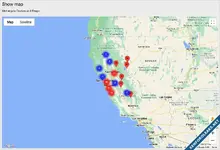
(Example of Show map)
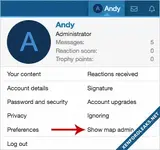
(Example of Show map admin link)
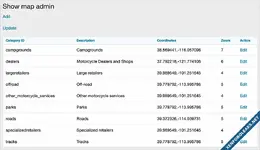
(Example of Show map admin page)
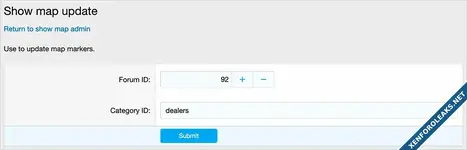
(Example of Update page)
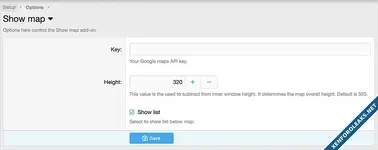
(Example of Options page)
(Example of User group permissions)

Features:
Install and configure the View map add-on located here:
www.xf2addons.com
The View map add-on allows you to easily create the map bbcode.
Setup step 2:
Update the Options page with your Google JavaScript API key.
Setup step 3:
Using the 'Show map admin' link in the visitors tab, create a map category by clicking the Add link.
Example:
Description - dealers
Detail - Dealers and shops
Coordinates - 37.339386,-121.894956
Zoom - 6
Setup step 4:
Create a forum where you will have threads of a certain type. For example you would have a Dealers forum. Each thread will represent a dealer which has information about that particular dealer. In the first post of each thread you will need to insert a map bbcode. This code looks like this:
[map=37.339386,-121.894956]View map[/map]
You can get this map bbcode using the View map add-on.
Setup step 5:
Using the 'Show map admin' link in the visitors tab, click the Upgrade link which will create the map.
Note anytime you add a thread to the forum you created in step 4, you will want to update the map by using the Update link.
Showing the map:
Add 'showmap' to your forum URL followed by a query parameter, this will be one of your category IDs.
Example:
You can create a Public navigation or Widget for the URL which calls a specific map.
Public navigation example:
This example shows how you can create a link in the sub-navigation of the Forums tab.
Admin control panel -> Setup -> Public navigation -> Add navigation
Navigation ID = showmap
Title = Show map
Parent navigation entry = Forums
Display order = 1000
Type = Basic
Link = {{ link('showmap/?id=dealers') }}
Database modifications:
This add-on will create two tables in your database:
andy_show_map
andy_show_map_data
A fully integrated map system based on forums and threads.
Live example here: www.southbayriders.com
The Show map add-on is designed to show a maximum of a few hundred markers. Each marker requires a thread which will describe the business or location.
(Example of Show map)
(Example of Show map admin link)
(Example of Show map admin page)
(Example of Update page)
(Example of Options page)
(Example of User group permissions)
Features:
- Individual maps are created for each forum.
- Map markers link back to threads.
- All phrases start with showmap_ for your convenience.
Install and configure the View map add-on located here:
www.xf2addons.com
The View map add-on allows you to easily create the map bbcode.
Setup step 2:
Update the Options page with your Google JavaScript API key.
Setup step 3:
Using the 'Show map admin' link in the visitors tab, create a map category by clicking the Add link.
Example:
Description - dealers
Detail - Dealers and shops
Coordinates - 37.339386,-121.894956
Zoom - 6
Setup step 4:
Create a forum where you will have threads of a certain type. For example you would have a Dealers forum. Each thread will represent a dealer which has information about that particular dealer. In the first post of each thread you will need to insert a map bbcode. This code looks like this:
[map=37.339386,-121.894956]View map[/map]
You can get this map bbcode using the View map add-on.
Setup step 5:
Using the 'Show map admin' link in the visitors tab, click the Upgrade link which will create the map.
Note anytime you add a thread to the forum you created in step 4, you will want to update the map by using the Update link.
Showing the map:
Add 'showmap' to your forum URL followed by a query parameter, this will be one of your category IDs.
Example:
You can create a Public navigation or Widget for the URL which calls a specific map.
Public navigation example:
This example shows how you can create a link in the sub-navigation of the Forums tab.
Admin control panel -> Setup -> Public navigation -> Add navigation
Navigation ID = showmap
Title = Show map
Parent navigation entry = Forums
Display order = 1000
Type = Basic
Link = {{ link('showmap/?id=dealers') }}
Database modifications:
This add-on will create two tables in your database:
andy_show_map
andy_show_map_data
Attachments
![[Andy] View map](https://xenforoleaks.net/data/attachments/0/168-229265282e8e0d4ae5600ecd7d1cad87.jpg?hash=vM31-qpwTN)

![[Andy] Members map](https://xenforoleaks.net/data/attachments/0/200-ae3cc8afa12c43fed392a5a444196cb6.jpg)
![[Andy] Show new registrations](https://xenforoleaks.net/data/attachments/0/229-52a2a7585b64a8d4f018b2b53662bd56.jpg)
![[Andy] Show profile posts](https://xenforoleaks.net/data/attachments/1/1918-b382b006f2ebdb77e1cae4a2c097e33f.jpg?hash=-_Q2UHjWQA)
![[Andy] Show profile post comments](https://xenforoleaks.net/data/attachments/1/1913-86cbd2d09187acdc7e5a0ecf28430f17.jpg)