![[Andy] User upgrade expired reminder](https://xenforoleaks.net/data/attachments/0/305-f377f746fcba3b2d526f7c4867f5634d.jpg)

- Joined
- Oct 27, 2025
- Messages
- 352
Description:
Creates a direct message when a members account upgrade has expired.
This add-on runs on the first of the month to remind the member their account upgrade has expired. It can be set to run for 1 month (default) or more months if desired.
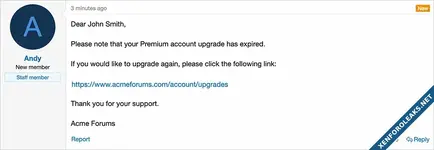
(Example of direct message)
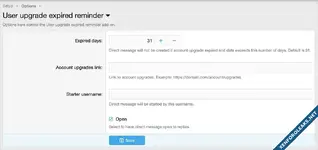
(Example of Options page)
Features:
Update the options page with your Account upgrades link and Starter username.
Questions and Answers:
Q: When does the add-on run?
A: It runs once a month (first day of the month) and checks for any user upgrades which have expired within the past 31 days.
Q: How many time will the member get these reminder direct message?
A: By default just once. If you wish to send for more months, increase the Expired days value in the options page. For example set to 62 days if you want to remind the member twice.
Q: Can I run the Cron entry manually?
A: Yes. For example if you want to send to all members which have expired account upgrades with the past year, set the Expired days to 365 and run the cron entry manually. Be sure to set the Expired days back to 31 after you are done.
Q: Will an email also be sent?
A: Yes if the member has "Receive email when a new direct message is received" selected in their preferences.
Creates a direct message when a members account upgrade has expired.
This add-on runs on the first of the month to remind the member their account upgrade has expired. It can be set to run for 1 month (default) or more months if desired.
(Example of direct message)
(Example of Options page)
Features:
- Direct message is created automatically via Cron entry.
- All phrases start with userupgradeexpiredreminder_ for your convenience.
Update the options page with your Account upgrades link and Starter username.
Questions and Answers:
Q: When does the add-on run?
A: It runs once a month (first day of the month) and checks for any user upgrades which have expired within the past 31 days.
Q: How many time will the member get these reminder direct message?
A: By default just once. If you wish to send for more months, increase the Expired days value in the options page. For example set to 62 days if you want to remind the member twice.
Q: Can I run the Cron entry manually?
A: Yes. For example if you want to send to all members which have expired account upgrades with the past year, set the Expired days to 365 and run the cron entry manually. Be sure to set the Expired days back to 31 after you are done.
Q: Will an email also be sent?
A: Yes if the member has "Receive email when a new direct message is received" selected in their preferences.
Attachments
![[Andy] User upgrade expired](https://xenforoleaks.net/data/attachments/0/275-1b8c5199fbba2fa1555e37d07eae1437.jpg)

![[Xen-Soluce] User Upgrade Duration](https://xenforoleaks.net/data/attachments/1/1028-1a106aa37aeb7cf24478109042113ca5.jpg)

![[Andy] Account upgrade purchase history](https://xenforoleaks.net/data/attachments/1/1755-b0234371457af95907df7be7c3fa7475.jpg)
![[Andy] User connected account](https://xenforoleaks.net/data/attachments/0/175-adafecd5d4adc3c1fbf4c69fa1e117db.jpg)
![[Andy] Members map](https://xenforoleaks.net/data/attachments/0/200-ae3cc8afa12c43fed392a5a444196cb6.jpg)