![[cXF] Style Variations in Navigation](https://xenforoleaks.net/data/attachments/1/1476-b947b1631003c6a51dd7bccd2fefde2f.jpg)

- Joined
- Oct 27, 2025
- Messages
- 352
Description:
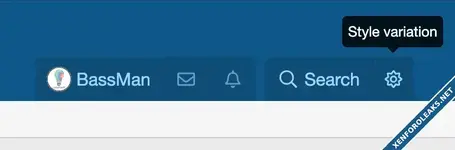
Add style variation button to the main navigation next to the Search button (before or after).
LIVE DEMO:
*if you are not using style variations, you might be interested in this add-on: [cXF] Light and dark mode switch
To set the position for a style, please check the style properties for that add-on.
*supports [cXF] Top Navigation
Screenshots:
< before Quick search (standalone) >

< before Quick search (next to it) >
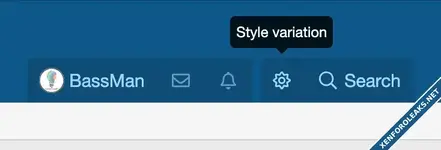
< after Quick search (standalone) >

< after Quick search (next to it) >
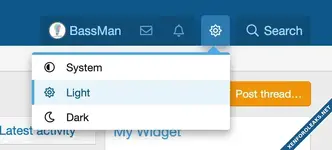
When you click the icon, it will open the menu:
Add style variation button to the main navigation next to the Search button (before or after).
LIVE DEMO:
eReadersForum.com
Connecting e-book reader enthusiasts.*if you are not using style variations, you might be interested in this add-on: [cXF] Light and dark mode switch
To set the position for a style, please check the style properties for that add-on.
*supports [cXF] Top Navigation
Screenshots:
< before Quick search (standalone) >
< before Quick search (next to it) >
< after Quick search (standalone) >
< after Quick search (next to it) >
When you click the icon, it will open the menu:
Attachments

![[AP] Style Suite](https://xenforoleaks.net/data/attachments/0/79-c7ac0d82ab8fcfcefb4177771dd5842a.jpg)

![[cXF] Sidebar for Media](https://xenforoleaks.net/data/attachments/1/1721-55082d88cedb7e9bcb6df08050d1678e.jpg)
![[cXF] Node Stats Icons](https://xenforoleaks.net/data/attachments/1/1700-7db80e2202f0738a68312219dfd1c40a.jpg?hash=Dk9-lCIQ7h)