Description:
Video optimizer for all attached videos.
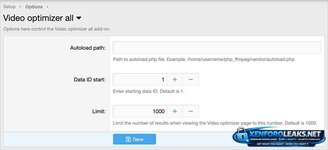
(Example of Options page)

(Example of Video optimizer all link in the visitor menu)

Setup step 1:
Install php_ffmpeg by following the instruction in this thread:
https://www.xf2addons.com/threads/how-to-install-php_ffmpeg.1537/
Setup step 2:
Go to the options page and enter the Autoload path.
How to use:
At the terminal change directory to where your forum is installed, then enter the following command:
php cmd.php xf-rebuild:videooptimizerall
Questions and answers:
Q: What does optimizing do?
A: When a user attaches a videos for example video.mov which is 30MB in size, the add-on will convert it to video.mp4 and the new video will be about 2MB in size. The optimized video will look the same without any loss in video resolution.
Q: Which video extensions are supported?
A: mp4, m4v, mov, avi, wmv, flv, mkv, webm
Q: Can I monitor the progress of the video attachments being optimized?
A: Yes. Click the Video optimizer all link in the visitor menu.
Video optimizer for all attached videos.
(Example of Options page)
(Example of Video optimizer all link in the visitor menu)
Setup step 1:
Install php_ffmpeg by following the instruction in this thread:
https://www.xf2addons.com/threads/how-to-install-php_ffmpeg.1537/
Setup step 2:
Go to the options page and enter the Autoload path.
How to use:
At the terminal change directory to where your forum is installed, then enter the following command:
php cmd.php xf-rebuild:videooptimizerall
Questions and answers:
Q: What does optimizing do?
A: When a user attaches a videos for example video.mov which is 30MB in size, the add-on will convert it to video.mp4 and the new video will be about 2MB in size. The optimized video will look the same without any loss in video resolution.
Q: Which video extensions are supported?
A: mp4, m4v, mov, avi, wmv, flv, mkv, webm
Q: Can I monitor the progress of the video attachments being optimized?
A: Yes. Click the Video optimizer all link in the visitor menu.