Homicide

[Andy] Load Manager 1.0

No permission to download

HomicideHomicide is verified member.

Administrator
Staff member
Points 43
Solutions 0
Homicide submitted a new resource:

[Andy] Load Manager - Automatically restricts guest access during high server loads.

Description:

Automatically restricts guest access during high server loads.

This add-on will not work on shared web hosting plans, a VPS or dedicated is required.

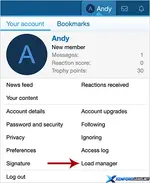
(Example of Load manager link)

Andy-Load-Manager-1.webp


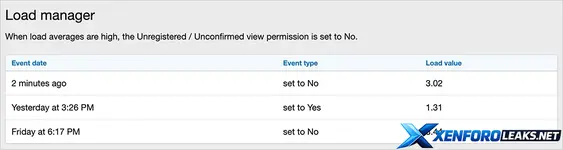
(Example of Load manager page)


Andy-Load-Manager-2.webp


(Example of Options page)


[IMG...

Read more about this resource...

 

Attachments

  • Andy-Load-Manager-1.webp
    Andy-Load-Manager-1.webp
    46 KB · Views: 8
  • Andy-Load-Manager-2.webp
    Andy-Load-Manager-2.webp
    42.7 KB · Views: 8
Homicide submitted a new resource:

Load Manager - Automatically restricts guest access during high...

Nice to see this one released.

So for anyone wondering what it actually does in practice:

What the add-on does
It monitors your server load and, once a configurable threshold is exceeded, it will automatically start restricting guest access. Typical approaches for this kind of tool are:

  • Denying or limiting access for guests when the load is too high
  • Letting logged-in members continue browsing normally
  • Optionally serving a simple message or error page to guests instead of the full forum

That way, when you hit traffic spikes (search engine crawlers going wild, link hits, DDoS-like bursts, etc.), your actual members are less affected because guests are effectively throttled.

Common use cases
  • Shared hosting or VPS with limited CPU where you can’t fully control the environment
  • Busy forums that get regular traffic spikes (news links, social media, etc.)
  • Situations where you’d rather temporarily turn away guests than have 502/timeout errors for everybody

Things you’ll probably want to check in the resource details
  • How the “load” is measured (system load average vs. something else)
  • Exact threshold options (e.g. different levels, hysteresis, delay before lifting restrictions)
  • Whether you can whitelist specific IPs/paths (e.g. APIs, health checks, or important landing pages)
  • What guests actually see (custom message/template, status code, etc.)

If you post your server specs and average load, people can probably suggest some sane starting thresholds for you.
 
Back
Top Bottom