
Points
43
Solutions
0
This is a sample picture of what the addon looks like fully setup and working
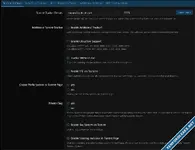
Note: You will ALWAYS be running your Tracker with the following checked Tracker without port, Enable SSL on Tracker and Enable Private Flag
XBT defaults to port 2710, which I suggest you use unless you have more then one website running xbt tracker.
** Since I have more then one website running the xbt tracker you will notice I have it set to 2715.
If you have your xbt tracker setup and connected to your website you will see the following message in your XenForo Admin Control Panel.
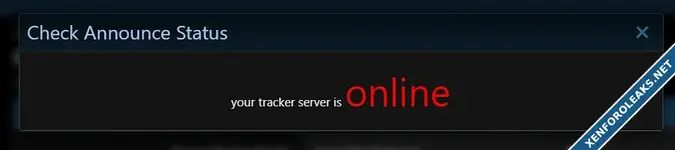
If you see a message in the box that says server OFFLINE, then your website is NOT connected to the xbt tracker system.
Notice that the tracker has to be setup on a sub-domain and a reverse proxy needs to be setup for the sub-domain
Also note that you must have an "A" record setup at the primary domain that points the sub domain, and it must have an SSL certificate for the sub domain.
Here is the code for the reverse proxy of your sub-domain
IMPORTANT NOTE: MAKE SURE FRIENDLY URLS IS NOT TURNED ON IN YOUR ADMIN CONTROL PANEL, THE TORRENT TRACKER WILL NOT WORK WITH IT TURNED ON.
If you do not set this part up correctly, your torrents will not work properly.
If you have any issues contact me in the support forums.
Please note that if you require help and I have to access your server, I will need root access. However if your doing your own work that is fine too.
Note: You will ALWAYS be running your Tracker with the following checked Tracker without port, Enable SSL on Tracker and Enable Private Flag
XBT defaults to port 2710, which I suggest you use unless you have more then one website running xbt tracker.
** Since I have more then one website running the xbt tracker you will notice I have it set to 2715.
If you have your xbt tracker setup and connected to your website you will see the following message in your XenForo Admin Control Panel.
If you see a message in the box that says server OFFLINE, then your website is NOT connected to the xbt tracker system.
Notice that the tracker has to be setup on a sub-domain and a reverse proxy needs to be setup for the sub-domain
Also note that you must have an "A" record setup at the primary domain that points the sub domain, and it must have an SSL certificate for the sub domain.
Here is the code for the reverse proxy of your sub-domain
PHP:
location ~ / {
    rewrite ^(.*)$ $1?ip=$remote_addr break;
    proxy_pass http://127.0.0.1:2710;
    proxy_redirect off;
    proxy_set_header Host $http_host;
    proxy_set_header X-Real-IP $remote_addr;
    proxy_set_header X-Forwarded-For $remote_addr;
    log_not_found off;
}
IMPORTANT NOTE: MAKE SURE FRIENDLY URLS IS NOT TURNED ON IN YOUR ADMIN CONTROL PANEL, THE TORRENT TRACKER WILL NOT WORK WITH IT TURNED ON.
If you do not set this part up correctly, your torrents will not work properly.
If you have any issues contact me in the support forums.
Please note that if you require help and I have to access your server, I will need root access. However if your doing your own work that is fine too.
Last edited:
