![[Andy] Banner 2.5](https://xenforoleaks.net/data/attachments/0/36-1fab5ca850cac647bff16d10d7df51bc.jpg)

- Joined
- Oct 27, 2025
- Messages
- 352
Description:
Banner management system.
Displays banners in your header, forum list, forum view and thread view and widget. The Banner add-on is designed to serve self hosted images.
(Example of banners displayed in the forum list)

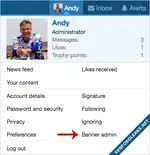
(Example of Banner admin link in visitors tab)
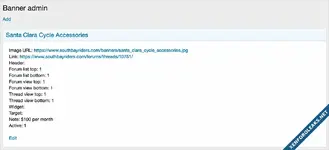
(Example of Banner admin page)
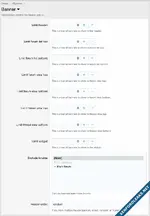
(Example of Options page)
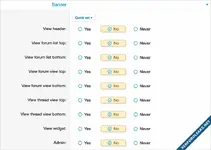
(Example of User group permissions)
Features:
To add a banner widget in the sidebar do the following:
Admin Control Panel -> Appearance -> Widgets
Add widget
Select Banner and Add widget
Enter the following:
Widget key = banner
Title = {enter widget block title}
Display in positions = Forum list: Sidebar
Questions and Answers:
Q: What is a good dimension for banner images?
A: I suggest 375 x 60.
Database modification:
This add-on will add a table called xf_andy_banner to your database.
Banner management system.
Displays banners in your header, forum list, forum view and thread view and widget. The Banner add-on is designed to serve self hosted images.
(Example of banners displayed in the forum list)
(Example of Banner admin link in visitors tab)
(Example of Banner admin page)
(Example of Options page)
(Example of User group permissions)
Features:
- Banners can be displayed in 8 different locations in the Banner admin page.
- The number of banners per location can be set in the Banner options page.
- Which user group sees banners can be set in the User group permissions.
- Banners can be disabled in mobile view in the banner.less template.
- Banners are displayed in random order, each page reload displays a new set of banners.
- Multiple header banners have the option to display in 'random' or 'name' order.
- All phrases start with banner_ for your convenience.
- In the Admin Control Panel, set User group permissions.
- In the banner options page, set the number of banners to show for each location.
- In the Visitor tab, click the Banner admin link.
- Click the Add link.
- Fill out the information and save.
To add a banner widget in the sidebar do the following:
Admin Control Panel -> Appearance -> Widgets
Add widget
Select Banner and Add widget
Enter the following:
Widget key = banner
Title = {enter widget block title}
Display in positions = Forum list: Sidebar
Questions and Answers:
Q: What is a good dimension for banner images?
A: I suggest 375 x 60.
Database modification:
This add-on will add a table called xf_andy_banner to your database.
Attachments
![[XenDev] Banner Advertisement](https://xenforoleaks.net/data/attachments/2/2077-f086ebcc5b194b698297a54f4f17bfef.jpg)

![[Andy] Build thread banner](https://xenforoleaks.net/data/attachments/0/562-9023c7673f391b911868b85da5c0ac92.jpg?hash=J85rC8GR-o)

![[Andy] Thread starter user banner](https://xenforoleaks.net/data/attachments/1/1584-6b9d20147dcba20922da5ee79f28b4d2.jpg?hash=x12v-QZBwe)
![[XFCoder] User Avatar and Banner Lists](https://xenforoleaks.net/data/attachments/2/2003-2176b15a4c8f85629ad1274a223318da.jpg)
![[XB] XFRM: Resource Banner](https://xenforoleaks.net/data/attachments/0/971-abc53381cb42c561f41c37018fbb9404.jpg)