![[Andy] Block country](https://xenforoleaks.net/data/attachments/0/11-d4a71656cdfcd8d1c0021610fa516681.jpg)

- Joined
- Oct 27, 2025
- Messages
- 352
Description:
Blocks access to specified countries.
When a visitor from a blocked country clicks the Contact us, Log in, Register or thread link, they are shown an error message.
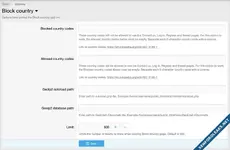
(Example of Options page)
(Example of error message)

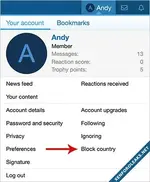
(Example of Block country link)
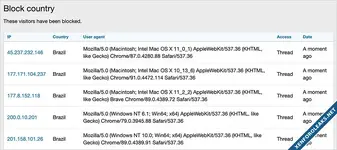
(Example of Block country page)
Features:
This add-on requires using the GeoIp2 library. Here is a link which explains how to install the GeoIp2 library.
 xenforoleaks.net
Go to options page and enter the country codes you want to block. Or if you prefer you can enter the country codes which you allow. Add your GeoIp2 paths.
Viewing which countries were blocked:
Click the Block country link in the visitor menu. Must be an admin to see this link.
Database changes:
A table called andy_block_country is created in your database.
Blocks access to specified countries.
When a visitor from a blocked country clicks the Contact us, Log in, Register or thread link, they are shown an error message.
(Example of Options page)
(Example of error message)
(Example of Block country link)
(Example of Block country page)
Features:
- All phrases start with blockcountry_ for your convenience.
This add-on requires using the GeoIp2 library. Here is a link which explains how to install the GeoIp2 library.
The GeoIp2 library allows reading the GeoLite2 database located on your server and you can lookup as many IP addresses as you like. The GeoIp2 library is free and is easy to install. Installation instructions Create a directory called misc in your public_html directory. Log into your server...
xenforoleaks.net
Go to options page and enter the country codes you want to block. Or if you prefer you can enter the country codes which you allow. Add your GeoIp2 paths.
Viewing which countries were blocked:
Click the Block country link in the visitor menu. Must be an admin to see this link.
Database changes:
A table called andy_block_country is created in your database.
Attachments
Last edited:
![[Andy] Block VPN](https://xenforoleaks.net/data/attachments/1/1974-cd4a23a33cad64927095fde8f5d0bce3.jpg)

![[Andy] Block IP](https://xenforoleaks.net/data/attachments/0/248-c1edc6b086560f974848cc3ac2ecfeea.jpg)
![[Andy] Register moderate by country](https://xenforoleaks.net/data/attachments/0/197-56deecc9b9f5835bed51a03605c56616.jpg)
![[Andy] Country flag](https://xenforoleaks.net/data/attachments/1/1559-2450baafebd852ab77ee1f34d368f189.jpg)
![[Andy] Footer block](https://xenforoleaks.net/data/attachments/1/1142-fd35ffd7eb07b6f447edc45f8126d9a1.jpg)