![[Andy] Google custom search](https://xenforoleaks.net/data/attachments/0/285-f766075acebd771bcbc20afa3bb1c908.jpg)

- Joined
- Oct 27, 2025
- Messages
- 352
Description:
Replaces XenForo search with Google custom search.
(Example of Search tab)

(Example of Search page)

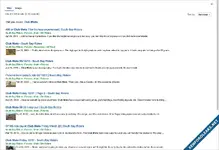
(Example of search results)
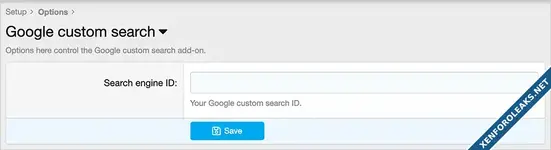
(Example of Options page)
Features:
All phrases start with googlecustomsearch_ for your convenience.
Setup step 1:
Go to the Google custom search start page:
developers.google.com
Log into your Google account.
Click the 'Get started' link.
Click the 'create an instance of a Programmable Search Engine' link.
Click the 'Control Panel' link.
In the field 'Name your search engine' enter any name.
In the field 'Enter a site or pages' enter *.domain.com use your domain.
Select Image search.
Click Create.
Copy the code that is provided.
Setup step 2:
Go to the Options page and enter your Search engine ID. This is the part after the cx= part of the code provided from step 1.
Setup step 3:
Go to User group permissions and set the following for the Google custom search:
Registered = Yes
Unregistered / Unconfirmed = Yes
Questions and answers:
Q: What is the link in Google to view my search engine control panel?
A: programmablesearchengine.google.com
Replaces XenForo search with Google custom search.
(Example of Search tab)
(Example of Search page)
(Example of search results)
(Example of Options page)
Features:
All phrases start with googlecustomsearch_ for your convenience.
Setup step 1:
Go to the Google custom search start page:
developers.google.com
Log into your Google account.
Click the 'Get started' link.
Click the 'create an instance of a Programmable Search Engine' link.
Click the 'Control Panel' link.
In the field 'Name your search engine' enter any name.
In the field 'Enter a site or pages' enter *.domain.com use your domain.
Select Image search.
Click Create.
Copy the code that is provided.
Setup step 2:
Go to the Options page and enter your Search engine ID. This is the part after the cx= part of the code provided from step 1.
Setup step 3:
Go to User group permissions and set the following for the Google custom search:
Registered = Yes
Unregistered / Unconfirmed = Yes
Questions and answers:
Q: What is the link in Google to view my search engine control panel?
A: programmablesearchengine.google.com
Attachments
![[Andy] Direct message search](https://xenforoleaks.net/data/attachments/0/578-91a4f0f77082c674ccfcffab7298b369.jpg)

![[Andy] Easy search](https://xenforoleaks.net/data/attachments/0/206-e7a5e7c0681e72cdd8d19f2f93280f7f.jpg)
![[Andy] Quick search](https://xenforoleaks.net/data/attachments/0/16-60f2ade1d15057a65926ab5284c65c5c.jpg)
![[Andy] Advanced search](https://xenforoleaks.net/data/attachments/0/51-57c63953e23c1b14e66e2e841df84abd.jpg?hash=9PO-cYSBE6)
![[Andy] Attachment filename search](https://xenforoleaks.net/data/attachments/0/438-53e9f7758b10f82d6a71cdf63bd0c97f.jpg)