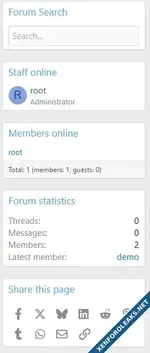
![[MusaPekel] FindNode – Smart Forum/Category Search Widget](https://xenforoleaks.net/data/attachments/1/1596-f9ad3982a7e74ef276795a36f1466cac.jpg)

- Joined
- Oct 27, 2025
- Messages
- 136
What is it?
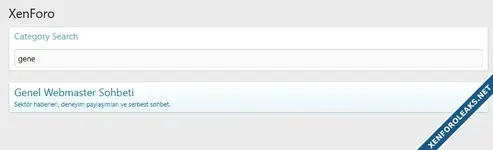
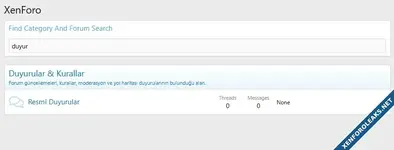
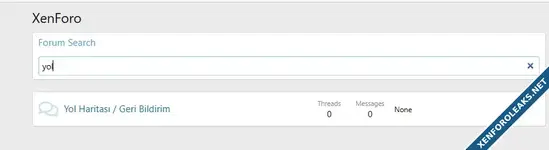
MusaPekel FindNode is a live filtering widget for XenForo 2.3 that lets users quickly narrow down categories and forums on the forum index without leaving the page. As users type, the on-page list is filtered in real time. It supports three modes:- All: Matches both category titles and forum titles.
- Forums only: Matches forum titles only; category headers are hidden while searching.
- Categories only: Matches category titles only; forum rows are hidden while searching.
Why use it?
- Faster discovery: Jump to the right forum or category instantly on large boards.
- In-place filtering: No page reloads, no redirects—just instant narrowing of the current list.
- Theme friendly: Uses default XenForo selectors; compatible with most themes.
- Accessible: Keyboard-friendly search and filter flow.
Installation & Placement
- Install the add-on (AdminCP or CLI).
- Go to Appearance → Widgets and add Find Node (musapekel_find_node).
- Recommended positions:
- forum_overview_top (top of forum list)
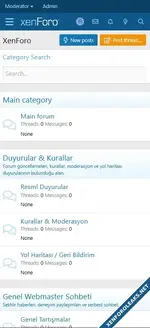
- forum_list_sidebar (sidebar)
- Optional: In Widget Options, choose Filter type: All, Forums only, or Categories only.
Note: In the sidebar position, the widget waits until the main content DOM (forum list) is ready, then binds. No jQuery required.
How it works
- The widget targets forum index category/forum DOM nodes only.
- Input is normalized (diacritics/Turkish letters) and filtering is applied on the fly.
- Visibility of category headers and/or forum rows is toggled according to the selected mode.
Performance & Compatibility
- Client-side only (vanilla JS), no extra HTTP requests.
- Scales well; for extremely large boards, consider tightening CSS selectors to your theme.
- Verified on XenForo 2.3. Custom themes may require minor selector tweaks.
FAQ / Troubleshooting
- “Widget doesn’t work in sidebar.” The script waits for the main content to mount. If it still fails, your theme may use different class names—adjust selectors (e.g., .block--category, .node--forum, .block-row.node, .node-title a).
- “Column 'title' / 'active' is unknown.” Use correct XF:Widget / XF:WidgetDefinition fields for XF 2.3. Fields like title/active/display_order aren’t DB columns; ordering lives inside the positions JSON.
Attachments
![[Supergatto] Traffic Counter & Forum Statistics (Real-Time, GeoIP, AMS)](https://xenforoleaks.net/data/attachments/1/1883-9dbfb8c459d5ba08349fa7cb02fb1410.jpg)
