Nitro

[Andy] Print manager 1.1 2026-03-16

No permission to download

NitroNitro is verified member.

Support Staff
Staff member
Support
Points 43
Solutions 0
Nitro submitted a new resource:

[Andy] Print manager 1.1 - Provides PDF page for posts, direct messages and resource content

Provides PDF page for posts, direct messages and resource content.

Clicking the Print manager icon will bring up the content in a PDF viewer. This allows printing or saving as a PDF file.

(Example of Print manager icon)
View attachment 6730

(Example of post in PDF viewer)
View attachment 6731

(Example of Options page)
View attachment 6732

(Example of User group permissions)
[ATTACH type="full"...

Read more about this resource...
 
The Print manager add-on requires the mPDF library to be installed on your server.

These instructions have been tested on a web host which has cPanel.

For Plesk, you will need to create the mpdf folder in your user root folder ie: /var/www/vhosts/<domain> or add the mpdf folder via Plesk's file manager and make sure it's outside the httpdocs folder (not accessible from the web).

Follow these steps:
  1. Create a directory called mpdf in your /home/username directory.
  2. Log into your server using SSH. Important, do not log into SSH as root, log in as cPanel user.
  3. Navigate to the mpdf directory.
  4. Enter the following command composer require mpdf/mpdf
  5. Composer will install the mPDF library.
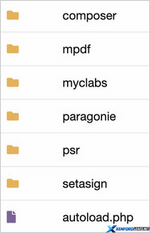
A new directory called vendor contains the files needed to use mPDF.

Example of the vendor directory.
1773621400471.png

mPDF is a PHP library which generates PDF files from UTF-8 encoded HTML.
https://mpdf.github.io/
 
Back
Top Bottom